Bot results, settings, optimization Telegram channel https://t.me/revenueautotradebot
Posts

Top providers on Zulutrade
If you are still interesting in using Zulutrade platform for forex trading please read new posts on http://forexdumbo.blogspot.com/ During past 4 month I`m trying to analyze top providers .Use translator because blog in Russian language. Merry Christmas and Happy New Year!!!
New trading week.
The last seven days was not so profitable as previous one but nevertheless we are in profit. Statistics for the last 7 days first: Profit 109 pips or $1,385.37 Trades 18 Winning trades 17 (94%) Total statistics for 10 weeks: Running weeks-10 Profit 2,805 pips Balance $30,003.54 Trades 247 Winning trades 242 (98%) Ranking 70 From next trading week we begin to use more tight stop loss.Hope it will be more suitable for accounts less then 2000$.Average SL is now about 150-250 pips. Good luck and all the best!
Two month with ZuluTrade.
Zulupro I am working with Zulutrade platform as provider for 2 month already. I would like to present some results of my work here now. Profit 2,249 pips or $23,657.29 Trades 213 Winning trades 209 (98%) Ranking 193 I have one follower with live account now.He uses micro account and earned 108 pips with zulupro. Good luck and hope to see you among my subscribes soon :0).
Zulupro- first week results with ZuluTrade.
I would like to present the results of my first week as provider with ZuluTrade platform.Hope it will be interesting for the readers of my blog and I may be for the future subscribers to my signals. So,during this first week i have 132 closed trades with 99% of winning.Profit in pips +1535 that`s 15470 in $.I think it`s not bad result for the first week.Even if I will close 3 open position with -535 pips DD the result will be 1000 pips per week. As you can see my favourite pair is GBP/USD.But if my system gives me strong clear signal I can open position with any pair.By the way I have to remind that I use trading system which combines technical analysis and all fundamentals . Good luck and let`s get profits together :0)!
Zulupro-new zulutrade provider.
May I introduce you a new ZuluTrade provider Zulupro . Main statistic data: Running weeks-4 Profit 1,368 pips Balance $13,652.97 Trades 123 Winning trades 122 (99%) Let`s take profit with Zulupro!
Bonuses from brokers
Receive a bonus! There are several account deposit bonus programs available through brokers work with ZuluTrade. An indicative list of current promotional programs follows: InvestTechFx subsidizes all accounts between $5,000 and $10,000 with an extra 5% and all accounts over $10,000 with an extra 10% of the deposited amount. Ikon-Royal offers a range of cash bonuses from $150 to $1500 for initial deposits that span between $5,000 and $50,000. Ava Fx adds $50 to every new trader’s account between $100 and $1,000, $100-$1,000 to new traders’ accounts between $1,000 and $10,000 and $1,200 to new traders’ accounts between $10,000 and $50,000. Open demo account with Zulutrade
Live Zulutrade accounts.
Dear readers! If you have any questions concerning the process of opening and adjusting new live Zulutrade accounts write me on zulupro /dog /gmail.com .
New Brokers with Zulutrade.
Last news from Zulutrade about new brokers. ZuluTrade is back with 4 new and very promising partnerships! We are proud to announce a new collaboration with 4 new Brokers. Alpari,Invest Tech FX ,ODL and Prime 4X has numerous benefits for any prospective investor. To you investing in any of them could mean: - A beneficial option of opening a new Micro Account with as low as 100 $. Also there is only 2 pips spread on 6 majors. - A unique opportunity of opening a Standard Account of only 1000 $ with only 1 pip spread on majors. - The chance of opening either Silver or a Golden Account that offers you a BONUS of 5-10% - Last but not least, Invest Tech FX offers you the widest leverage of 1:500
Once again about proper choice of the providers for ZuluTrade live account.
One of the participants of ZuluTrade Paul Howarth tried to systematize the сriteria and requirements to be considered when selecting providers for the live accounts. So what needs to take into consideration when choosing providers: * Find providers who average 3 hours or less per trade. * Find providers with live users. * Find traders with over 100 trades and a win % over 90%(I think more then 75%). * Make sure the signal providers use stops. * Restrict the amount of open trades each provider can open.I use two max per signal provider.(Breaking this rule can cause a fast margin call and force your broker to close loosing trades with out notice). * Keep your meta trader open just in case the web site has tech issues. * Open a mini account and trade small lots until you understand how your signal providers trade. * Start with a Demo account. Avoid * New signal providers. * Signal providers with less than 100 winning trades. * Signal providers with Large M...
ZuluTrade.Live account.Statistics for April.
ZuluTrade.Live account. Statistics for April. Opened positions : 67 ZL -48 ProB5 -19 Closed with "+" 66 Closed with "-" 1(Zl) -51 pips or 51.51$ Earned 279 pips or $285.19 -PrpB5 623 pips or $646.83 -Zl In total two signal providers earned for April by 902 points or $ 932.02.
Live account statistics.
Statistics for the period from 03.31 till 04.03 : -closed position-24 - closed with profit 23 -closed with the "-" 1 -earned pips 227 -total $ 229.69 Good luck and wait for Monday.
Fist results with ZuluTrade live account.

Finally my live Zulutrade.com account is all set up and trading I will try to post everyday statistics from it. By the way I opened live account with FXCM. Provider Date Open Type Lots Currency Open Date Closed Close Pips/$ zl8931657 04/01/ 08:11 BUY 1 EUR/JPY 130.055 04/01 08:14 130.103 5.0 pips $4.87 zl8931657 04/01/ 07:42 BUY 1 GBP/USD 1.43484 04/01 08:00 1.43635 15.0 pips $15.10 zl8931657 04/01/ 04:24 BUY 1 EUR/JPY 129.999 04/01 07:34 130.144 15.0 pips $14.68 zl8931657 04/01/ 00:29 BUY 1 USD/JPY 98.400 04/01 04:20 98.493 9.0 pips $9.44 ...
Settings for Demo ZuluTrade Account.

Settings page for those who are going to use a conservative strategy for trading Forex market.
Сhoose the signal-providers for ZuluTrade.Main tips.
Before we get into choosing a provider we need to have a good understanding of what a signal provider is. A signal provider is a trader or analyst that generates trades that in turn get placed on your account (through or ZuluTrade platform). You can have several signal providers trading your forex account or just one. These guidelines will give us something to look for when choosing signal provider.Go to the http://zulupro.zulutrade.com (dont login into account) and click More providers > Now You are on the statistics page of signal-providers(SP) The first thing is weather the trader is a winner or a loser. This may seem obvious to nearly everyone, but I often see losing signal providers with 50-100 people trading their signals.Pay attention on Graph,Pips и Profit. The next thing is how long they have been a winner. I recommend th...
Open Demo on ZuluTrade.Step by step.
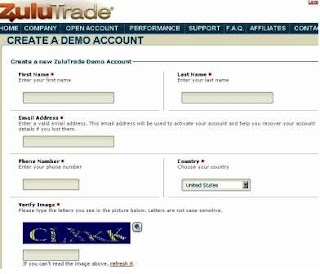
I think it`s time to test our system .Please visit our site zulupro.zulutrade.com Step1. Click on OPEN ACCOUNT on the top menu of the website or OPEN FREE ACCOUNT. Step2. At a 'sign-up' webpage, please click on open a demo account (link on the left). Step3 Now you are on the CREATE A DEMO ACCOUNT page (a screen-shot is shown below). An important tip: always use the same email address for each account you set-up at Zulutrade, even when you set-up a live account later as the system will then let you switch between accounts from the same interface as it will recognise that they are all your accounts, so be sure to use a reliable email address that you can keep using during registration.Please complete the demo account sign-up form by entering your first and last name, email address, phone number and then select Country, enter the verification code and click the Creat e my Demo Account button at the bottom. Step4 Once you click the Create my Demo Acco...
Choosing a provider for ZuluTrade account.
With the growing popularity and easy access to the foreign exchange (ForEx) market, more and more people are drawn to it as their financial vehicle of choice. Along with this popularity come all the extras. This includes all kinds of software, trading systems for sale, books, videos, and third party signal party providers. Today I’m going to touch on a few points when seeking out a third party forex signal provider. Before we get into choosing a provider we need to have a good understanding of what a third party signal provider is. A signal provider is a trader or analyst that generates trades that in turn get placed on your account. You can have several signal providers trading your forex account or just one. Like anything else, all third party signal providers are not created equal. At first glance a trader may look like a home run. That ...
FAQ about ZuluTrade.
Below is all You have to know about ZuluTrade Platform 1. Opening a Demo account with Zulutrade 2. Opening a Live account with Zulutrade 3. Setting up your account with your Broker 4. Selecting Signal Providers to auto trade your account 5. Managing your account 6. What do the settings in your account mean, and how to use them 1. Max Open Lots 2. Lots Per Provider 3. Stop/Start button 4. Max Lots 5. Configure 6. Reverse 7. Limit, Stop, Trail, and Breakeven 8. Remove 7. Open Positions 8. Pending Orders 9. Trade History 10. Create a Trade 11. Signal Providers, Commissions, PayPal, etc. 12. Affiliates, commissions, PayPal, etc. - Opening a Demo account with Zulutrade If you wish to test the revolutionary system out, please visit the website at zulutrade.com , select 'open live account' on our homepage. From there you will be prompted to either open a demo or a live account, choose to select a dem...